Free 15-minute live demo for licensed advisors · Bring one stalled case
For licensed annuity, IUL & retirement advisors

Bring One Stalled Case. In 15 Minutes, We'll Show You the Screen That Gets the Yes.

Your prospect said "let me think about it." On a free, live Zoom, we run their real numbers in RetirementView Pro, show you the red, and hand you the one question that turns waiting into "what do we do?"
  • 15 minutes, live, one-on-one
  • Your real case. Rough numbers. No names.
  • Keep the technique whether you buy or not
Takes 30 seconds · For licensed advisors only
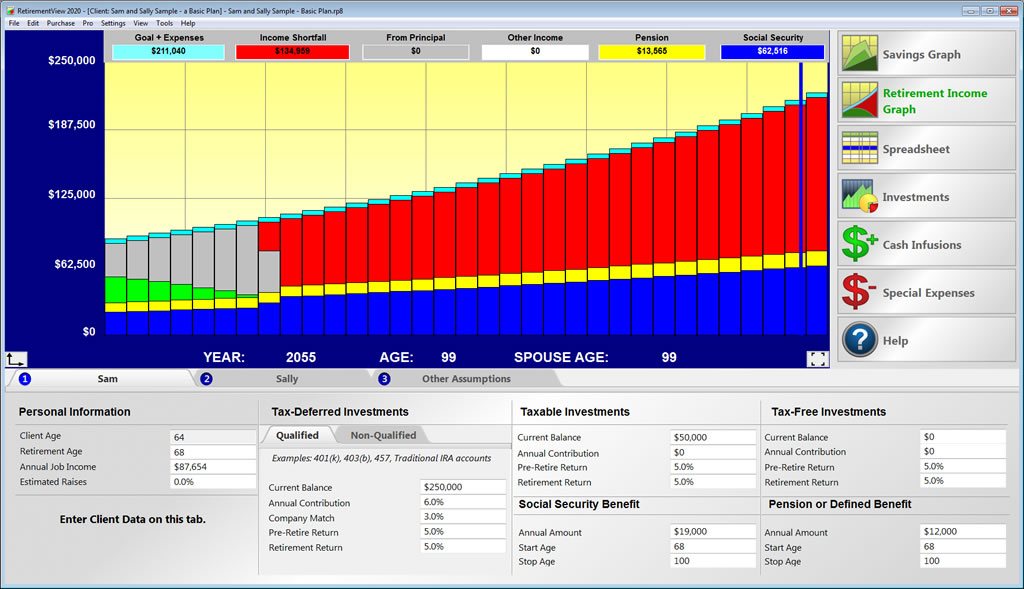
RetirementView Pro retirement income graph showing a red income shortfall
Watch the 2-minute tour

Tim Turner, founder, walks through the screen in 2 minutes

Since 1993Built for one job: the meeting
Thousandsof advisors & agents use it
10–15 minto build a full retirement picture
Mac & PCWorks live in person or on Zoom

As seen in

Wall Street Journal, ABC, CBS News, Fox News, NBC News, USA Today, Financial Planning, BusinessWeek, Financial Advisor
Sound familiar?

You Did Everything Right. Then They Said, "Let Me Think About It."

You built trust. The numbers were solid. They were nodding the whole time.

Then the meeting ended, and so did the case.

You followed up. Voicemail. A nice text. Then nothing. Two weeks later they bought from someone else, or they did nothing at all.

Here's the part nobody tells you: they didn't say no to you. They said no to something they couldn't feel. And there's a reason they couldn't feel it...

BL
Bob & Linda (Tues appt)
Today 9:02 AM
Thanks again for meeting with us yesterday!
We talked it over last night...
We're going to think about it for a bit. We'll reach out when we're ready 🙂
Sounds good! No rush.
Read 9:14 AM
2 weeks later
Hi Bob & Linda! Just checking in. Any questions? 😊
Delivered
The real reason

It Wasn't Your Pitch. It Was the Paper.

Most prospects can't feel a 40-page plan. They skim it. They get confused. And confused people wait.

Spreadsheets don't scare anyone. Monte Carlo charts don't scare anyone. But one picture does. It shows the year their money runs out, in bright red, using their own numbers.

When they see that, waiting stops feeling safe. Here's what it looks like...

RetirementView Pro screen: red bars show the years the client's income falls short
Red = out of money

Show Them This. Ask One Question. Then Stop Talking.

Green means the money lasts. Red is every year it doesn't. You build it live in 10 to 15 minutes, then turn the screen around.

YouIs that what you were planning?
...silence. Let it sit.
Your prospectNo. That's why I'm meeting with you. Can you help me fix this?

Then you show one fix, live, and watch the red turn green. That's the whole close. In the demo, we'll do it on your stalled case.

Real advisors. Real numbers.

Advisors Who Show the Red Stop Losing Cases to "I'll Think About It."

Doubled production: $5MM to $10MM
"We literally doubled our production from $5MM last year to $10MM this year using the RetirementView software. Clients love it."

Ted PhillipsInvestment Advisor, Georgia
Doubled his closing ratio in a couple of months
"I doubled my closing ratio in just a couple of months using RetirementView Pro."

Alan CantrellFinancial Advisor, Retirement Strategies Group, Arkansas
$2–3 million in new money a month
"Torrid Tech's RetirementView is allowing me to open $2 to 3 MM dollars of new money a month..."

Mike SavareseFinancial Advisor, California
"The cost ratio is 100 to 1"
"I recently completed a retirement plan, with a CPA, for his own retirement, who said 'This is the best software I have seen so far.' If I only use the revenue that my firm received from that one plan, the cost ratio for this product is 100 to 1."

Jim Manna, CLU, ChFCFinancial Advisor, Today & Tomorrow Strategies, Florida
"It breaks the ice"
"The most important and valuable results I have had are the 'breaking of the ice' when people react because it was their own numbers used and they became more co-operative."

Joseph PereiraAdvisor, Miami, Florida
"Hands down the best tool on the market"
"I have checked out many retirement planning software tools and this one is still my favorite. It keeps things so simple so that the client can really understand and follow along."

Antonio FilipponeFinancial Advisor, Rockford Retirement, Illinois
Individual results. Yours will depend on your practice.
Your 15 minutes

Here's Exactly What Happens on Your Free Demo

No slides. No feature tour. Just your case, live.

Minutes 0–3

You give us one stalled case

Rough numbers only. Age, retirement date, savings, what they spend. No names, no client files.

Minutes 3–10

We build their picture live

You watch us fill in the blanks. Then the red shows up, right where your prospect will see it.

Minutes 10–13

We show you the question

The exact words to say when the red appears, and how to turn red into green with your solution.

Minutes 13–15

You keep the technique

Use it in your next meeting. If you want the software, we'll show you how. If not, no hard feelings.

"But I already have software"

Already Have Planning Software? Good. Keep It.

Your planning software builds a great plan. After the meeting. But your sale doesn't happen after the meeting. It happens in it.

Typical planning software
RetirementView Pro
Built to
✕Make a plan after the meeting
✓Win the meeting
Time to build
✕Long setup and data entry
✓10–15 minutes, live
What they see
✕Pages of numbers
✓One picture. Red = out of money.
How they feel
✕Confused, "let me think"
✓"Can you help me fix this?"
Where it runs
✕Usually the cloud
✓Your Mac or PC. Data stays with you.

Most advisors who use RetirementView run it right next to their planning software. One builds the plan. The other gets the yes.

Read this first

This Demo Isn't for Every Advisor. Is It for You?

We keep these one-on-one, so we only book advisors we can actually help.

Book a demo if you...

  • Sell annuities, IUL, life insurance or retirement income
  • Are licensed and meeting with prospects every month
  • Hear "let me think about it" more than you'd like
  • Want to close in the first or second meeting
  • Like to sit with clients, in person or on Zoom

Skip it if you...

  • Are planning your own retirement (we have a consumer version for that)
  • Want a lead list. This is a closing tool, not leads.
  • Like printing 100-page reports
  • Want a hands-off app that runs without you
1993The year one question started all of this
Why this exists

A Cardboard Slider Started It All.

Tim Turner was in a 401(k) plan at work. Nobody could tell him how much to save. HR handed him a cardboard slider and wished him luck.

He thought, "Why isn't there a simple program that just shows me?" That was 1993. RetirementView was born.

Today thousands of advisors and agents use it to show clients one simple picture, so the client can finally see the problem and ask for help.

Built since 1993
Mac & Windows
Installs on your computer
Works live on Zoom
Limited each week

Every Demo Is Live and One-on-One. So There Are Only So Many Each Week.

No webinar. No recording. A real person runs your real case. When this week's times are gone, the next openings are next week.

Questions

Everything Advisors Ask Before Booking

Yes. It's 15 minutes on Zoom, free. You keep the technique either way.
No. If you like it and want the software, we'll show you the options at the end. If not, you still leave with a closing technique you can use in your next meeting.
Rough numbers for one prospect who's stalled: their age, when they want to retire, about what they've saved, and about what they spend a month. No names and no client documents.
Licensed financial advisors, annuity and IUL agents, insurance agents, IMO/FMO agents, CPAs and planners who meet with prospects. If you're planning your own retirement, the consumer version is the right fit.
No. RetirementView Pro installs on your Mac or Windows computer, so client data stays on your machine. It works great on a big screen or shared on Zoom.
If you can fill in blanks, you can build a full retirement picture in 10 to 15 minutes. There's a 20-minute training video, and many advisors have their assistant enter the numbers.
$97 a month, $499 for 6 months, or $899 a year (most popular). Office multi-packs are available. We'll walk through it only if you ask.
Yes. Qualified and non-qualified annuities, lifetime annuity income, IUL and whole life income, life insurance needs, Roth conversions, rental properties and the sale of a business.
Your move

Your Next "Let Me Think About It" Is Already on Your Calendar.

Fix it before it happens. Bring one stalled case. 15 minutes. Free.

For licensed advisors only · Takes 30 seconds

Free 15-min demo · Bring one stalled case
